
Automated Lead Data Cleaning & Deduplication
Automated lead data cleaning workflow built with Make.com and Google Sheets to identify fresh and duplicate records, route them into separate sheets, and maintain a cleaner master lead database.
Short Summary
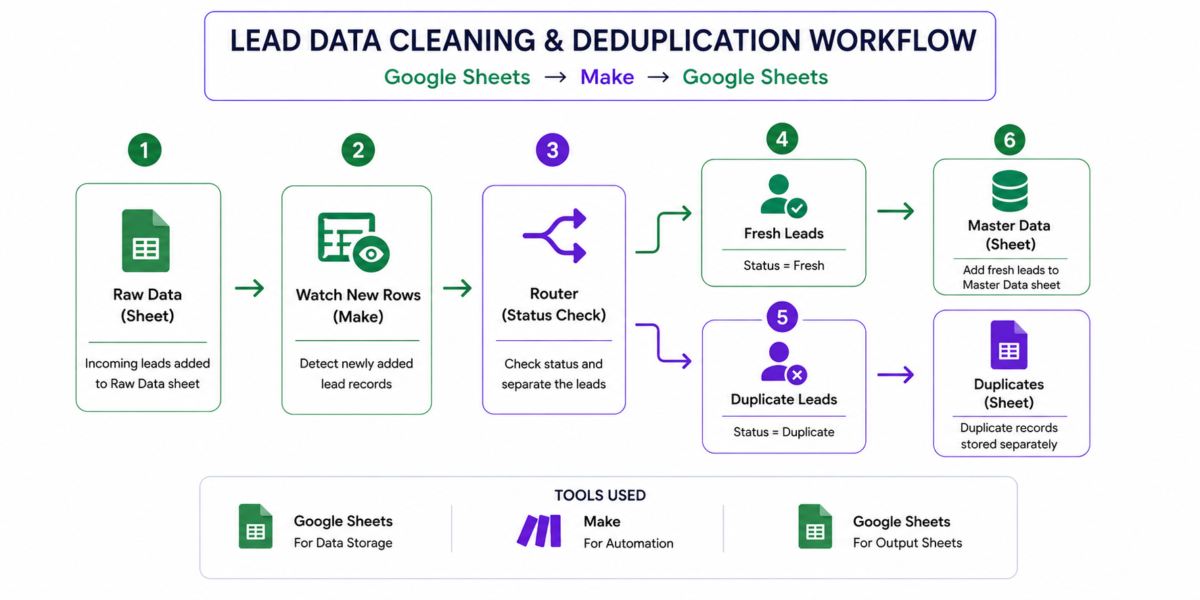
This project demonstrates a GTM data-management workflow that processes newly added lead records from a Raw Data sheet, routes them based on their status, separates fresh leads from duplicates, and adds accepted records to the Master Data sheet.
Core workflow:
Raw Data → Watch New Rows → Router → Fresh / Duplicate → Output Sheets → Master Data
Tools: Make.com, Google Sheets
Project Category
| Category | Details |
|---|---|
| Project Type | GTM Engineering / RevOps Automation |
| Primary Goal | Automate lead-data cleaning and routing |
| Workflow | Google Sheets → Make.com → Google Sheets |
| Input | Raw Data |
| Automation Layer | Make.com |
| Processing | Status-based routing |
| Fresh Output | Fresh Data |
| Duplicate Output | Duplicates |
| Master Database | Master Data |
| Core Use Case | Lead Data Hygiene & Deduplication |
Project Overview
As lead datasets grow, keeping prospect records clean becomes an important part of GTM operations. Incoming lead data needs to be separated from existing records so that fresh leads can be added to the master database without making duplicate records harder to manage.
To solve this problem, I built a Make.com workflow using Google Sheets that processes newly added lead records and routes them based on their status.
The workflow starts with a Raw Data sheet. Make’s Watch New Rows module detects newly added records and passes the data into a Router. The Router then separates records into two paths: Fresh and Duplicate.
Fresh records are sent to the Fresh Data sheet and added to Master Data, while duplicate records are routed to the Duplicates sheet.
The goal was to create a repeatable data-management process that makes lead handling more organized and reduces the manual effort involved in separating new and duplicate records.
The Problem I Wanted to Solve
When working with lead datasets, manually checking every incoming record against existing data can become time-consuming and difficult to manage consistently.
The main problem was:
How can incoming lead records be automatically separated into Fresh and Duplicate records and routed to the correct destination?
The workflow needed to handle the incoming data, apply the appropriate status-based logic, and ensure that each record reached the correct sheet.
This also required understanding how Make processes new spreadsheet rows, how data is passed between modules, and how individual fields need to be mapped into destination sheets.
Expected Business Impact
The workflow is designed to make lead-data management more consistent by separating fresh records from duplicates before they become part of the broader master dataset.
Fresh records can be reviewed in Fresh Data and added to Master Data, while duplicate records are kept separately in Duplicates.
This creates a cleaner structure for managing incoming leads and provides a more reliable foundation for downstream GTM activities that depend on organized lead data.
What I Built
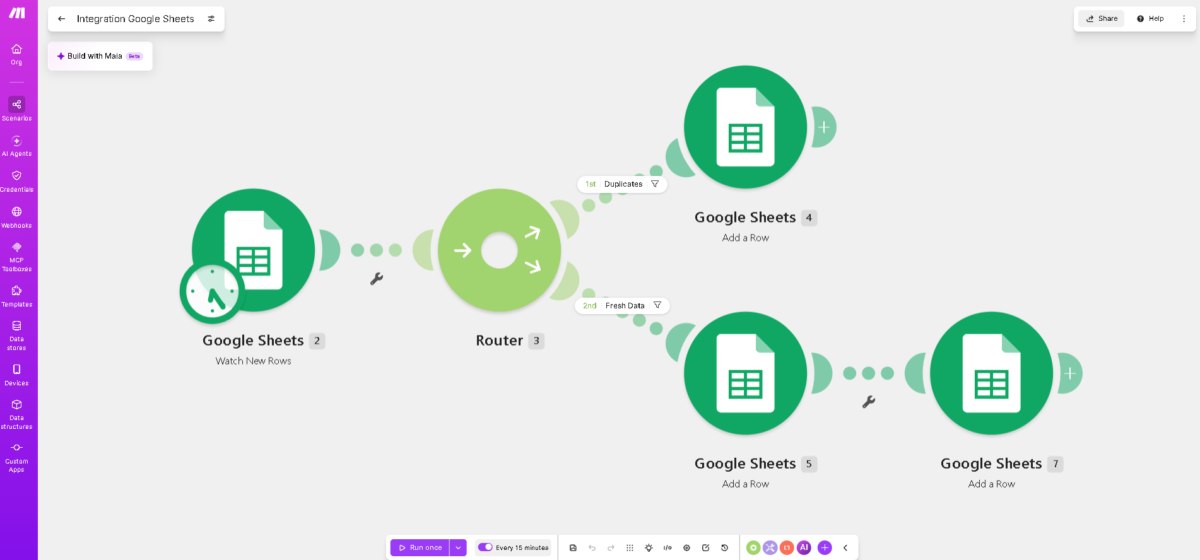
The core automation is:
Raw Data → Watch New Rows → Router → Fresh / Duplicate
The Watch New Rows module captures newly added records and makes their information available as Bundle 1.
The Router then evaluates the record’s Status and sends it through the appropriate route.
| Status | Router Filter | Destination |
|---|---|---|
| Fresh | Status = Fresh | Fresh Data |
| Duplicate | Status = Duplicate | Duplicates |
For fresh records, the lead is also added to Master Data.
The relevant fields mapped from Bundle 1 included:
Name · Company · Email · Phone · LinkedIn URL
Lead Data Management
The workflow uses Google Sheets as both the source and destination environment.
Raw Data acts as the incoming data layer, while Fresh Data, Duplicates, and Master Data serve different operational purposes.
This separation makes the workflow easier to manage because each sheet has a defined role:
Raw Data → Incoming records
Fresh Data → Newly accepted records
Duplicates → Duplicate records
Master Data → Consolidated fresh lead data
One important part of the implementation was understanding that Fresh and Fresh Data are not the same thing. Fresh is the Status value used by the Router, while Fresh Data is the destination sheet.
The same distinction applies to Duplicate and Duplicates.
My Approach
I approached the workflow from the data-flow-first perspective.
First, I identified the source of incoming records and how new rows should enter the automation. I then configured Watch New Rows and examined the output bundle to understand how Make was receiving the lead information.
Next, I created the Router logic using two status-based filters:
Status = Fresh
and
Status = Duplicate
After configuring the routes, I mapped the fields from Bundle 1 into the respective Add a Row modules.
For fresh records, I mapped the lead information into both Fresh Data and Master Data. Duplicate records were mapped to the Duplicates sheet.
I then tested the workflow using controlled new records and adjusted the processing limit to 20 during testing so multiple records could be processed in an execution.
GTM Workflow Architecture
The complete workflow can be viewed as:
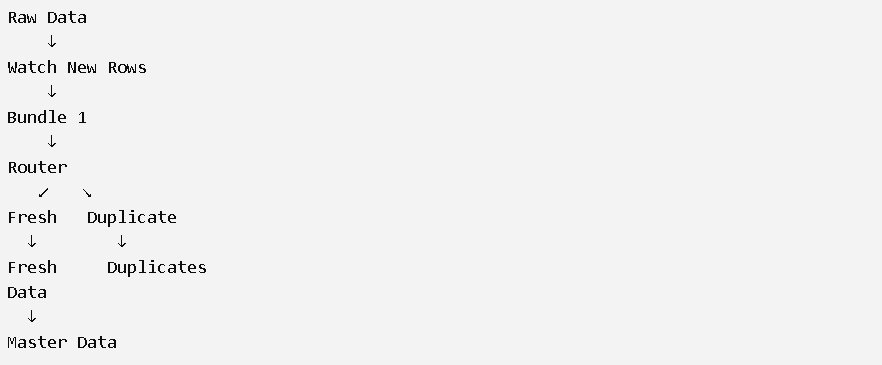
The workflow creates a simple data-quality layer between incoming lead records and the master database.
Instead of sending every incoming record directly into Master Data, the workflow first routes the record according to its status.
Challenges I Faced
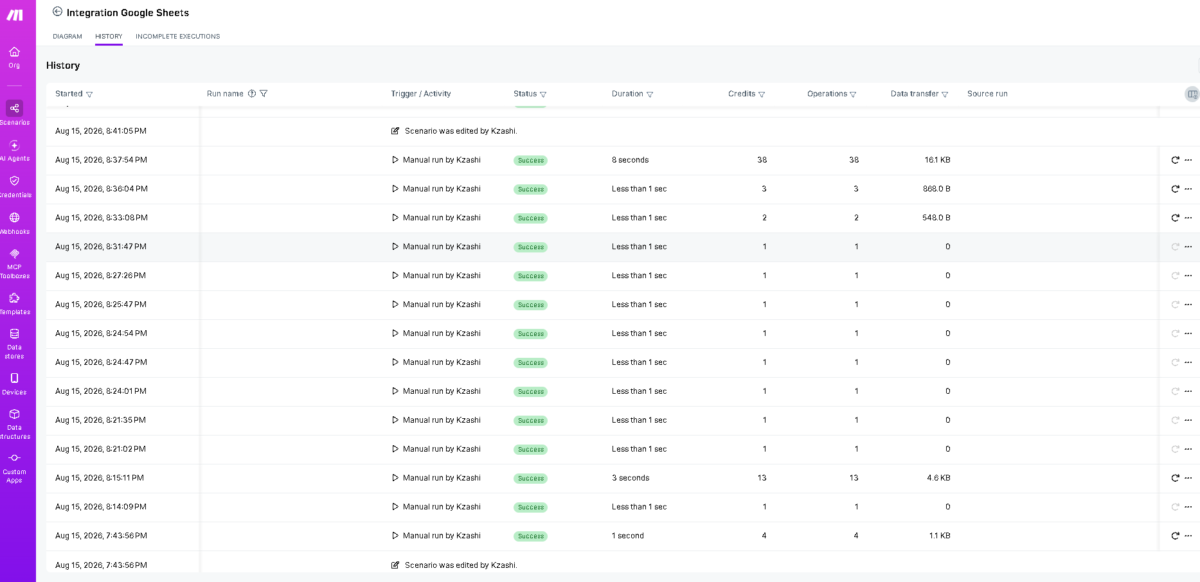
The first challenge was understanding why existing rows were not being processed. Watch New Rows only responds to newly added rows, so records that were already present in Raw Data were not automatically picked up during testing.
To test the scenario correctly, I started the workflow and added the records again as new rows.
I also initially had an issue where records were not being routed to the correct output sheets. The Router filters were not configured correctly, so I created separate conditions for Status = Fresh and Status = Duplicate.
Another important issue was field mapping. Selecting the destination sheets was not enough; I needed to explicitly map the information from Bundle 1 generated by Watch New Rows into the corresponding Add a Row fields.
Once I mapped Name, Company, Email, Phone, and LinkedIn URL, the lead data could be written correctly into the destination sheets.
I also encountered some confusion between status values and sheet names. Understanding that Fresh / Duplicate are status values, while Fresh Data / Duplicates are sheet names, helped me configure the routing logic correctly.
During testing, I increased the Watch New Rows Limit to 20 so that more newly added records could be processed in a single execution.
Deliverables
| Deliverable | Purpose |
|---|---|
| Raw Data | Incoming lead records |
| Watch New Rows | Detect newly added records |
| Router | Separate records by status |
| Fresh Data | Store fresh records |
| Duplicates | Separate duplicate records |
| Master Data | Maintain consolidated fresh data |
| Field Mapping | Transfer lead information between modules |
| Testing Setup | Process multiple records during testing |
Key Learnings
The biggest learning from this project was understanding how data actually moves through a Make.com workflow.
I learned that a trigger such as Watch New Rows only processes records that meet its trigger conditions, and that the output bundle needs to be understood before configuring downstream modules.
I also learned how Router filters control the path a record takes and why correct field mapping is essential when writing data into another Google Sheet.
Most importantly, the project showed me that lead-data automation is not only about moving records. It is also about creating a consistent process for determining where each record belongs and how it should be handled.
Skills Practiced
GTM Engineering
- GTM workflow design
- Lead data workflow architecture
- Process automation
RevOps
- Lead data management
- Data hygiene
- Deduplication
- Master data management
Automation
- Make.com
- Router & filter logic
- Trigger configuration
- Field mapping
- Workflow testing
- Error troubleshooting
Data Operations
- Google Sheets automation
- Structured lead data
- Record routing
- Data validation
Lead Management
- Lead classification
- Fresh vs. duplicate identification
- Lead database organization
- Data-quality management
Reflection
This project gave me practical experience working with lead-data operations and automation logic.
The most valuable part was troubleshooting the workflow when the expected records were not being processed or routed correctly. By following the data from Watch New Rows → Bundle 1 → Router → Add a Row, I learned how to identify where the workflow was failing and correct the configuration rather than simply rebuilding the entire scenario.
The final workflow provides a structured process for handling incoming lead data:
Raw Data → Watch New Rows → Router → Fresh / Duplicate → Fresh Data / Duplicates → Master Data
This project strengthened my understanding of GTM data hygiene, automation logic, field mapping, routing, and RevOps operations, while creating a foundation that can support cleaner downstream lead management.
Want to Explore More Projects?
Explore the more projects or get in touch to discuss a new idea.