
Automated Lead Outreach with Make.com & Brevo
Automated lead outreach workflow built with Make.com, Google Sheets, and Brevo, streamlining lead transfer, email campaign setup, and outreach management while reducing repetitive manual work.
Short Summary
This project demonstrates an automated GTM workflow that moves newly researched leads from Google Sheets into Brevo through Make and a Brevo API-based integration, creating a structured foundation for contact management and outbound email automation.
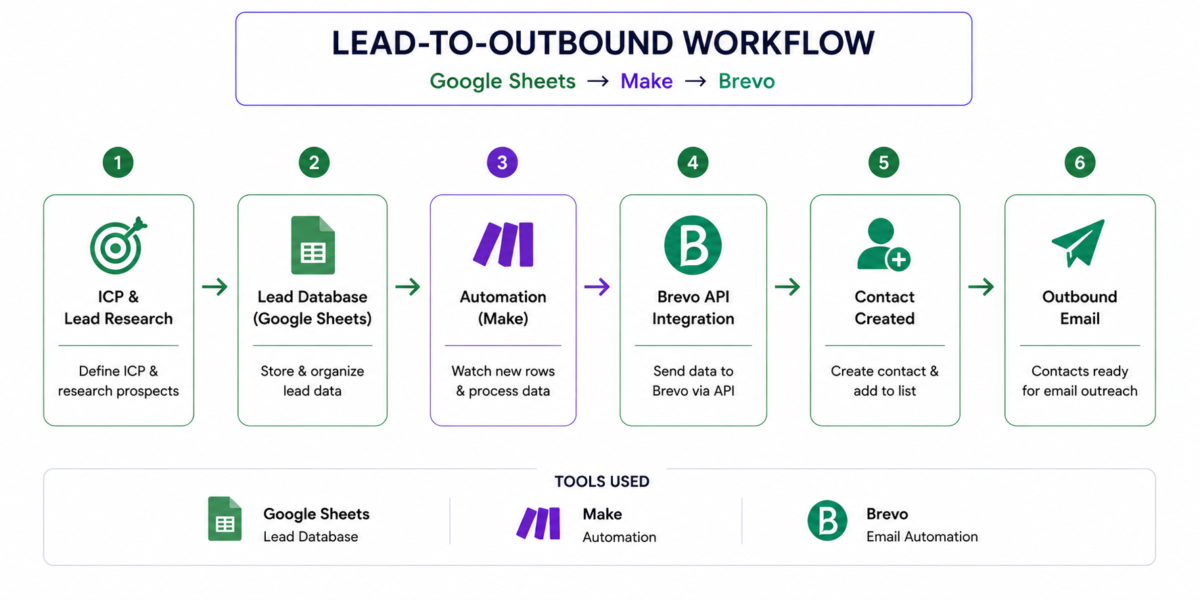
Core workflow:Lead Research(ICP) → Google Sheets → Make → Brevo API → Contact/List → Email Automation → Engagement Signals
Tools: Google Sheets, Make, Brevo, Brevo API, Apollo for prospect research.
Project Category
| Category | Details |
|---|---|
| Project Type | GTM Engineering / RevOps / Outbound Automation |
| Primary Goal | Automate lead ingestion and contact creation |
| Workflow | Google Sheets → Make → Brevo |
| Integration | Brevo API-based connection |
| Lead Source | B2B prospect research |
| Source Database | Google Sheets |
| Automation Layer | Make |
| CRM / Engagement Platform | Brevo |
| Trigger | New row added to Google Sheets |
| Schedule | Every 15 minutes |
| Outbound Use Case | Lead-to-contact automation |
| Next Layer | Email sequencing, engagement tracking and follow-ups |
Project Overview
In a B2B outbound process, researching prospects is only the beginning. Once a lead has been identified, the information needs to move into the system where it can be managed and used for outreach. When this process is handled manually, every new prospect requires repetitive copying, contact creation, list management, and quality checks.
To solve this operational gap, I built an automated lead-to-contact workflow using Google Sheets, Make, and Brevo. Google Sheets acts as the structured lead database, Make works as the automation layer, and Brevo acts as the contact and email-management platform.
The workflow monitors the lead sheet for newly added records. When a new lead is detected, Make captures the record and passes the relevant information to Brevo through an API-based connection, where the contact is created automatically.
The goal was not simply to connect two applications. I wanted to understand how prospect data can move through a practical GTM system from lead research and data organization to automated contact management and outbound execution.
The Problem I Wanted to Solve
The problem was not simply “How do I connect Google Sheets to Brevo?”
The real GTM problem was:
How can I create a reliable process that moves newly researched prospects into the outbound system with less manual intervention and consistent data handling?
Without automation, the process requires repeatedly copying prospect information from a lead database, creating contacts manually, selecting lists, and preparing those contacts for outreach.
Apart from consuming time, this creates opportunities for data-entry mistakes, inconsistent field mapping, missed records, and duplicate contacts.
I therefore designed the workflow around a simple principle:
Research once → structure the data → automate the handoff → activate the contact.
Expected Business Impact
The workflow is designed to reduce the operational effort involved in moving researched leads into the outbound system. Instead of manually creating every contact, newly added records can be processed automatically by the workflow.
This creates a more consistent process for lead ingestion, reduces repetitive data-entry work, and provides a cleaner foundation for subsequent outbound activities.
The larger GTM value is repeatability. Once the lead-to-contact process is automated, additional layers such as data validation, enrichment, segmentation, scoring, CRM synchronization, and engagement-based follow-ups can be added without redesigning the entire process.
What I Built
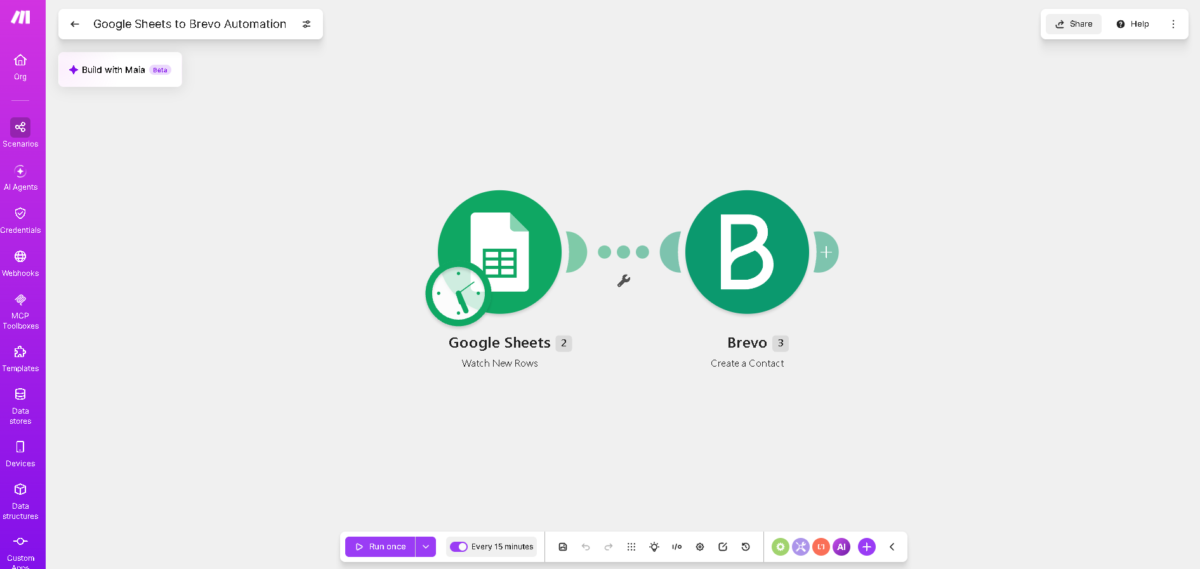
The core automation is:
Google Sheets — Watch New Rows → Make → Brevo — Create a Contact
The Google Sheets module monitors the lead sheet for new records. Make then maps the prospect fields into the Brevo contact structure.
The workflow was tested with real records to verify that:
- New rows were detected
- Lead information was transferred correctly
- Email addresses were mapped correctly
- Brevo contacts were successfully created
- Contact IDs were returned after successful creation
- Duplicate-contact errors were identified
- The scheduled workflow executed correctly
The automation was configured to check for new records at 15-minute intervals.
CRM & Lead Research
The lead database was structured before introducing automation because the quality of an automated workflow depends on the quality of the information entering it.
The Google Sheet was used to maintain prospect-level information in a consistent format. Fields visible in the lead database included contact details, professional information, company information, LinkedIn data, industry and location.
This structure created a reliable source for the automation. Instead of building the workflow around individual manual actions, the process was designed around a standardized lead record that could be automatically passed from one system to another.
From a RevOps perspective, this also creates a clear distinction between lead research and lead operations. Research produces the prospect record, while automation handles the operational movement of that record into the outbound system.
Outbound Automation
The Google Sheets → Make → Brevo workflow represents the first operational layer of an outbound system.
Once the contact is successfully created in Brevo, it can be organized into an appropriate contact list and subsequently used within Brevo’s email automation capabilities. Brevo also provides engagement events such as email opens, link clicks, and unsubscribes, which can be used as signals for future follow-up logic.
Therefore, the workflow can be extended beyond simple contact creation into a broader outbound process:
Lead → Contact → List → Email → Engagement Signal → Follow-up
I intentionally kept the core workflow focused on reliable lead ingestion rather than adding unnecessary complexity. The objective was to build a working foundation that can later support more advanced GTM automation.
My Approach
I approached the project from the process first, tools second perspective.
Before building the scenario, I identified:
- Where the lead originates
- What information needs to be captured
- Where the lead should be stored
- Which fields need to be mapped
- What should trigger the automation
- What should happen after the contact is created
- What could happen if the same email already exists
I then configured the Google Sheets trigger, established the Brevo API-based connection, mapped the relevant fields and tested the workflow with individual records.
Testing was an important part of the project because a workflow is only useful if it handles both successful and unsuccessful scenarios.
GTM Workflow Architecture
The complete GTM process can be viewed as:
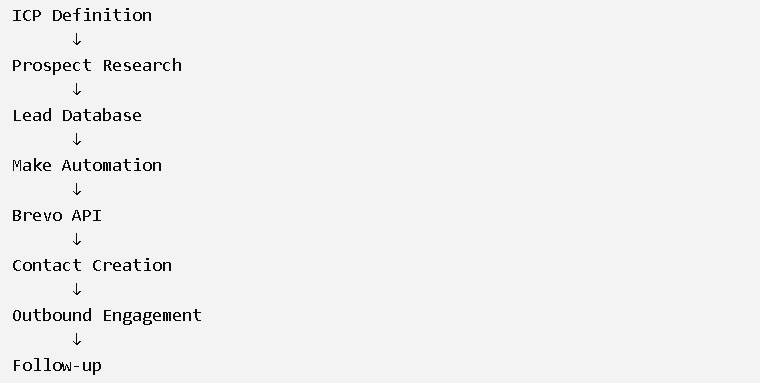
The important part of this architecture is the handoff between systems. Each platform has a defined role instead of being used independently.
Google Sheets manages the initial lead data, Make manages the workflow logic, and Brevo manages contacts and outbound engagement.
Challenges I Faced

1. Google Sheets configuration error
During setup, the Google Sheets module returned:
“Drive: Value must not be empty.”
I traced the issue back to the Google Drive/spreadsheet configuration and corrected the required source settings so that Make could properly identify the spreadsheet and sheet.
2. Header and field mapping
The Google Sheets module required the correct header configuration. I verified the header row and ensured that the spreadsheet structure could be correctly interpreted by Make.
3. Brevo duplicate-contact error
One of the most useful errors I encountered was:
“Unable to create contact, email is already associated with another Contact (duplicate_parameter).”
This showed that the workflow itself was functioning, but Brevo was rejecting a record because the email already existed.
Instead of treating this simply as a technical failure, I recognized it as a data-quality and deduplication problem — an important RevOps concept.
4. Testing successful records
I also tested new email addresses and verified successful Brevo responses, including returned Contact IDs, confirming that the records were actually created.
These issues gave me practical experience with integration debugging, data validation, API-based connections and workflow reliability.
Deliverables
| Deliverable | Purpose |
|---|---|
| Structured Lead Database | Maintain organized prospect information |
| Make Automation Scenario | Automate the movement of new leads |
| Google Sheets Trigger | Detect newly added prospects |
| Brevo API Integration | Connect the automation with Brevo |
| Contact Field Mapping | Transfer prospect information accurately |
| Automated Contact Creation | Create Brevo contacts without manual entry |
| Scheduling Configuration | Check for new records every 15 minutes |
| Testing & Troubleshooting | Validate successful and failed scenarios |
Key Learnings
The biggest lesson from this project was that GTM automation is not simply about connecting tools. It is about designing a reliable process between systems.
I learned how important structured data, field mapping, API-based integrations, trigger logic, scheduling, and deduplication are when building an operational workflow.
The duplicate-contact issue was particularly valuable because it demonstrated how a technically working integration can still require data-quality controls. I also learned the importance of testing actual records and validating the output instead of assuming that a configured workflow will always behave as expected.
Skills Practiced
GTM Engineering
- GTM workflow design
- Outbound process architecture
- Lead lifecycle management
RevOps
- CRM/contact operations
- Data hygiene
- Deduplication
- Process standardization
Automation
- Make
- API-based integrations
- Triggers and actions
- Field mapping
- Scheduling
- Error troubleshooting
Lead Research
- ICP research
- Decision-maker identification
- Prospect qualification
- Structured lead collection
Outbound
- Contact-list management
- Email automation
- Engagement-trigger planning
- Follow-up workflow design
Reflection
This project helped me move beyond using individual marketing tools and start thinking in terms of GTM systems and data flows.
The most valuable part was building the complete journey from a structured lead record to an automatically created Brevo contact and then troubleshooting the issues that appeared during testing.
I learned that a strong GTM workflow does not need to be unnecessarily complex. It needs to have a clear purpose, clean inputs, reliable automation logic, and a defined next step.
The workflow I built provides a practical foundation for a broader outbound engine where lead research can feed automated contact management, email engagement, and eventually more advanced processes such as enrichment, verification, segmentation, scoring, and follow-up automation.
Final workflow:
Lead Research → Google Sheets → Make → Brevo API → Contact Management → Outbound Engagement
This project demonstrates my ability to connect GTM strategy, lead data, automation, and revenue operations into one repeatable workflow.
Want to Explore More Projects?
Explore the more projects or get in touch to discuss a new idea.